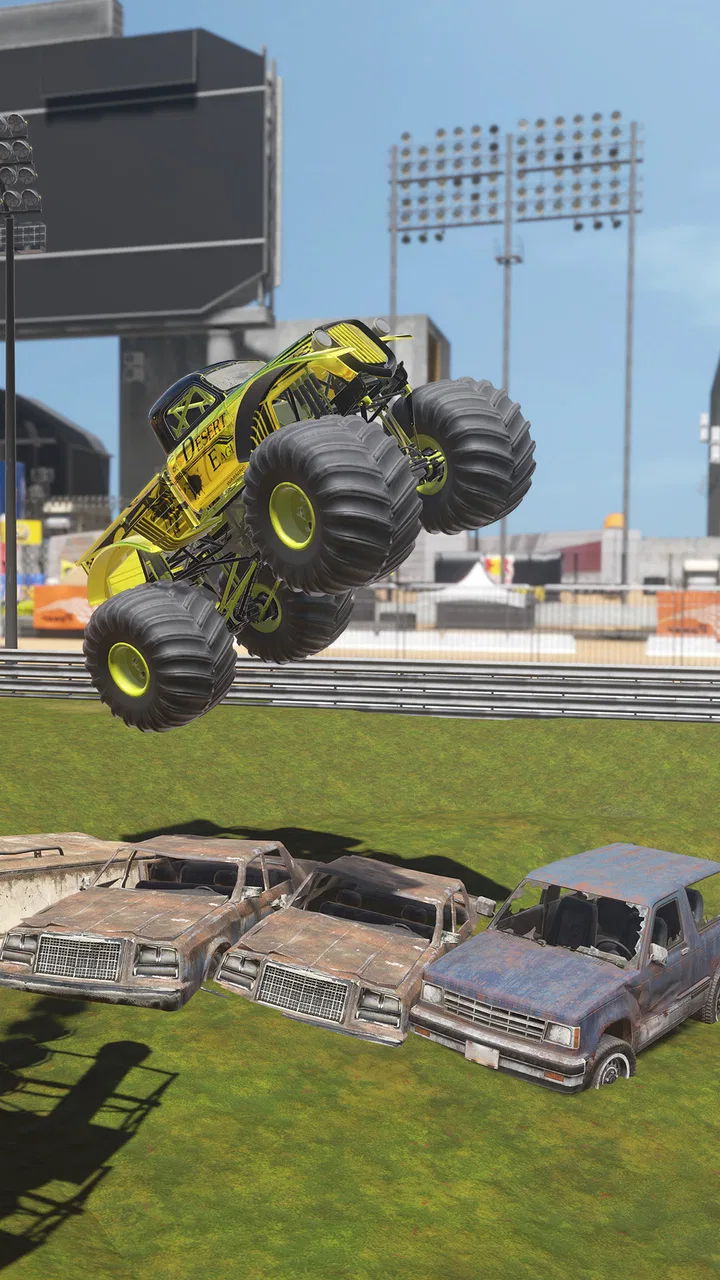
Wheel Offroad
- 4.4
- Rating
- 10.00M
- Installs
- Free
- Price

 Analysis by App-foxy
Wheel Offroad is the kind of racing game I open when I want a quick break rather than a serious driving simulation. Its focus is simple: take a monster truck away from smooth roads and deal with rough terrain, awkward angles, and the constant need to keep the vehicle moving. I found that simplicity appealing, but it also means the game depends heavily on how comfortable you are with trial and error.
Developed by HUAMING WANG, this free racing game is aimed at a broad audience and carries an Everyone age rating. It runs on Android 8.0 or later, and the current version is 1.4.9. The large audience is reflected in its rating of 4.4 from around 25 thousand ratings, while more than 10 million people have installed it. Those figures suggest that the straightforward off-road idea has found plenty of players, although popularity alone does not tell you whether its driving style will suit you.
What the off-road driving feels like in practice
The main appeal is the physical challenge of controlling a large vehicle on terrain that does not behave like a normal racing circuit. Instead of concentrating only on speed, I found myself thinking about balance, momentum, and whether a climb was worth attempting at full throttle. That makes each short session feel more like a sequence of small driving decisions than a conventional lap race.
You May Also Like

 Blood Strike: 2.5 Anniversary
Blood Strike’s Loadouts Turn Every Drop Into a Tactical Gamble
A close look at Blood Strike’s custom loadouts: how fast access to signature weapons reshapes its battle royale rhythm, rewards preparation, and narrows the gap between fights.

 Pandora - Music & Podcasts
Pandora’s Music Is Easy to Start, but Harder to Recover
Pandora’s strength is its low-effort path from a seed to a station. Its weak spot is how much confidence it asks you to place in connection, setup, and quiet recovery.

 8 Ball Pool
 Is Built on Rivalries, Rematches, and Routine
A close look at the rivalries, rematches, shared routines, and unanswered safety questions that turn a quick pool match into a persistent mobile community.

 Samsung Music
’s Quiet Strength Is Playing What You Already Own
Its reach comes less from spectacle than from dependable access to a personal library. That simplicity is both the app’s strongest retention engine and its ceiling.

 AccuWeather: Weather Radar
AccuWeather Review: A Quick, Clear Forecast for Everyday Decisions
For everyday plans, the best forecast is the one you can understand quickly. AccuWeather makes rain timing, radar, and local conditions easy to act on, with a few trade-offs.

 Hill Climb Racing
Why Hill Climb Racing Still Turns Crashes Into One More Run
A tiny car, a bumpy hill and one more upgrade: Hill Climb Racing keeps resurfacing because its simple chaos makes every near-miss feel personal.
More From Our News Desk



This is important because the game is not at its best when treated like an arcade racer where pressing the accelerator harder solves everything. A heavy truck can look powerful, yet rough ground quickly exposes poor timing. If I approached an obstacle too aggressively, the truck could lose its useful line or become difficult to recover. Slowing down before a steep section was often more effective than trying to force the vehicle through it.
The controls are easiest to understand when I treat them as tools for correction rather than constant commands. Small steering adjustments help preserve a workable angle, while sudden inputs tend to make difficult sections feel even less predictable. New players may initially blame the vehicle whenever a climb fails, but the more useful habit is to observe what happened immediately before the mistake.
The most useful early lesson is to manage momentum before the obstacle, not after it. Once the truck is already tilted or sliding away from the route, recovery becomes much harder. I recommend using the first attempts on any unfamiliar section to learn its shape instead of chasing a perfect run. That approach saves frustration and makes later attempts more deliberate.
Why some players get stuck quickly
The biggest source of friction is the gap between what the truck looks capable of doing and what the terrain actually allows. A monster truck suggests brute force, but off-road driving rewards positioning. If the front of the vehicle reaches a rise at the wrong angle, extra acceleration may only make the situation worse. This can feel unfair during the first few sessions, especially if you expect every visible route to be solved with speed.
Another sticking point is repeating a failed attempt without changing anything. I have found that simply trying the same line again is rarely useful unless the previous failure was caused by a small input error. A better reset is to change one variable: approach more slowly, steer earlier, or begin the climb from a slightly different side. Changing one thing at a time makes it easier to understand the terrain instead of turning every attempt into guesswork.
Players who prefer long races, licensed cars, detailed tuning, or competitive online events may also find the experience limited. Wheel Offroad is more appealing as a focused off-road diversion than as a replacement for a deep racing simulator. Its strength is the physical puzzle of getting a truck through difficult ground, not a broad collection of racing systems.
Checks that make the first session smoother
Before deciding that the game is not working properly, I would begin with the basics. Confirm that the device uses Android 8.0 or newer, then close other demanding apps if the game feels sluggish. A crowded device can make touch controls feel late or inconsistent, and that can easily be mistaken for poor driving response. Restarting the game after closing background apps is a simple first check.
I also recommend playing the opening attempts with the device held steadily and with enough screen space for comfortable control. Accidental touches are especially damaging in an off-road game because a brief steering change can alter the truck’s entire line. If your device has a case or grip that makes edge touches awkward, adjusting how you hold it may help more than changing your driving style.
Because the game is free, it is easy to install and try without committing money upfront. There are in-app purchases ranging from $2.99 to $9.99 per item, so I would avoid purchasing anything until I knew whether the basic driving loop was enjoyable. For a casual player, the sensible approach is to spend time learning the controls first and treat optional spending as something to consider only if the game genuinely earns longer-term attention.
It is also worth checking that the installation has completed properly and that the game is using its current version. Version 1.4.9 is the release I reviewed. If a problem appears immediately after installation, closing and reopening the game, checking available device storage, and trying again after a device restart are reasonable general steps. These checks do not change the game itself, but they remove common sources of avoidable trouble.
A better method for learning difficult sections
My preferred workflow is to divide each attempt into three phases. First, I use the approach to establish a stable line. Second, I reduce unnecessary steering while the truck is climbing or crossing uneven ground. Third, I correct the vehicle only after it has cleared the most dangerous part. This is less exciting than holding the accelerator and steering constantly, but it produces more repeatable results.
One non-obvious benefit of this method is that it separates control problems from route problems. If the truck fails even when I approach slowly and keep the angle steady, the chosen line may be poor. If it succeeds at a slower pace but fails at speed, momentum is the issue. That distinction helps me improve quickly because I am no longer treating every crash as the same mistake.
When a run goes wrong, I avoid immediately restarting several times in frustration. Instead, I pay attention to the moment where the vehicle stopped behaving as intended. Did the front wheels lose contact? Did the truck begin leaning before the obstacle? Did I overcorrect after a small slide? Remembering that single detail gives the next attempt a clear purpose. This is particularly useful for players who normally dislike repeated racing-game retries.
If the game appears to freeze, close unexpectedly, or stop responding, I would first repeat the general device checks rather than repeatedly tapping the screen. Exit the game, remove unnecessary background activity, confirm that the device is not short on storage, and relaunch it. If the issue continues, reinstalling may be a last resort, but I would only do that after considering whether any local progress could be lost. That is a practical precaution, not a promise about how progress is handled.
Separating driving difficulty from device problems
Off-road games create a tricky diagnostic problem because unstable driving can resemble technical lag. If steering feels inconsistent only during visually busy moments, the device may be struggling rather than the truck suddenly becoming unpredictable. Testing a few calmer sections can help identify whether the issue follows the terrain or follows the device’s performance.
Touchscreen interference is another possibility. Moisture, a poorly positioned finger, or an accidental palm contact can produce a steering change that looks like a control fault. I find it useful to make a short test run with clean, dry hands and a more deliberate grip. If the truck behaves normally afterward, the cause was probably interaction with the screen rather than the game’s off-road handling.
Connection problems are less relevant to the basic question of whether the driving feels right, so I would not begin troubleshooting there unless a particular part of the app clearly requires connectivity. For the core driving experience, the most useful checks are the operating-system requirement, device performance, touch accuracy, and a clean relaunch. Keeping the diagnosis narrow prevents wasted time on unrelated settings.
There is also a difference between a genuine crash and a failed vehicle recovery. A truck that has reached an awkward angle may look frozen for a moment when it is actually waiting for a better input or a restart of the attempt. I try a calm, minimal correction before assuming the application has stopped responding. If the interface itself does not react, then I treat it as a technical issue and use the basic restart steps instead.
How it compares with familiar racing alternatives
Compared with a traditional circuit racer, Wheel Offroad places less emphasis on clean laps and more on negotiating terrain. That makes it a better fit for someone who enjoys short mechanical challenges and does not need a detailed career structure. A conventional racing game is usually the stronger choice if you want high-speed competition, precise track memorization, or a large selection of polished road cars.
Compared with a full off-road simulation, this game is easier to approach. I can start driving without first learning a complicated setup routine or spending time adjusting a vehicle for every surface. The trade-off is depth: players looking for realistic suspension tuning, extensive vehicle management, or a detailed progression system may quickly want something more specialized.
It also differs from endless arcade driving games because the challenge is not simply to survive as long as possible at increasing speed. The off-road setting encourages me to think about individual obstacles and recoveries. That gives the game a more hands-on feel, but it can also make failed attempts feel repetitive if I am not interested in learning the terrain.
Who will enjoy it, and who should skip it
I would recommend it to someone who likes monster trucks, tactile driving challenges, and short sessions where improvement comes from better control rather than a long story. It works particularly well for a casual player who has a few minutes available and wants a game that can be understood quickly. The Everyone rating also makes it a broadly accessible choice for households looking for a simple racing game.
A realistic everyday use case would be a short break while waiting for an appointment. I could play a few attempts, focus on one troublesome climb, and close the game without needing to remember a complicated narrative or manage a large collection. That kind of stop-and-start use suits the straightforward design much better than trying to treat it as a long evening racing marathon.
I would skip it if my priority is online competition, licensed motorsport, deep customization, or a highly realistic driving model. I would also be cautious if repeated retries quickly irritate me. The game asks for patience with awkward terrain, and its simple presentation may not provide enough variety for players who need constant unlocks or a broad progression path to stay interested.
My practical verdict after spending time with it
Wheel Offroad succeeds when I approach it as a compact monster-truck handling game rather than a complete racing package. The free entry point makes it easy to test, and the off-road focus gives it a clear identity. I especially like that careful positioning matters more than blindly using maximum acceleration, because that creates a small but satisfying learning curve.
Its limitations are equally clear. The experience can become repetitive for players who want a large range of modes, and difficult sections may feel unforgiving until the relationship between speed, angle, and steering becomes familiar. The optional purchases also mean I would keep spending controlled until I was certain the basic loop deserved more investment.
My final advice is to give it a fair trial with a stable device, a careful grip, and a willingness to change your approach after each failed attempt. Do not judge the truck from the first few crashes, but do not force yourself to continue if the retry-based driving never becomes enjoyable. For the right player, this is a practical, approachable off-road racer; for someone seeking a deep simulation or a competitive racing platform, a more specialized alternative will be a better fit.
FAQs for Wheel Offroad
01What is the main objective of Wheel Offroad?
Wheel Offroad is a thrilling racing game where players navigate challenging terrains using specialized off-road vehicles. The main objective is to reach the finish line while overcoming obstacles such as mud, rocks, and steep hills. The game emphasizes skillful driving and strategic upgrades to enhance vehicle performance.
02How does the vehicle upgrade system work?
In Wheel Offroad, players can upgrade their vehicles by earning in-game currency through races and challenges. Upgrades can enhance various aspects such as speed, traction, and durability. These improvements are crucial for tackling more difficult tracks and increasing your chances of winning races.
03Are there different game modes available?
Yes, Wheel Offroad offers multiple game modes to keep players engaged. These include a career mode, time trials, and multiplayer races. Each mode presents unique challenges and objectives, providing a diverse gaming experience that caters to different playstyles and preferences.
04Is Wheel Offroad suitable for all ages?
Wheel Offroad is designed to be family-friendly, making it suitable for players of all ages. The controls are intuitive and easy to learn, while the graphics and sound effects are engaging yet appropriate for younger audiences. However, parental guidance is recommended for younger players to ensure a positive gaming experience.
05What are the system requirements for Wheel Offroad?
Wheel Offroad is optimized for both Android and iOS devices. It requires a minimum of Android 5.0 or iOS 10.0, with at least 2GB of RAM for smooth gameplay. Ensure your device has sufficient storage space for downloads and updates to prevent any performance issues.
Pros
- Intuitive controls enhance gameplay experience.
- Realistic graphics and terrains.
- Wide variety of vehicle customization options.
- Challenging levels keep players engaged.
- Frequent updates with new features.
Cons
- In-app purchases can be pricey.
- Occasional ads disrupt gameplay.
- Requires high-performance device.
- Limited offline functionality.
- Some levels feel repetitive.

Wheel Offroad
Gallery